하기 MariaDB 설치는 CentOS 7.x에서 진행 했습니다.
설치 순서는 Repository 등록 --> Mariadb 설치 및 보안 설정 순입니다.
우선 Repository 등록 (Mariadb에서 스크립트를 제공 하고 있음)
- wget 이 설치 되어 있지 않으면 설치 해준다.
$ sudo yum install wget
설치 파일은 아래 페이지에서 제공 하고 있으니 다운로드 받아 준다.
https://downloads.mariadb.com/MariaDB/
MariaDB - MariaDB
downloads.mariadb.com
$ wget https://downloads.mariadb.com/MariaDB/mariadb_repo_setup

or
$ curl -O -L https://downloads.mariadb.com/MariaDB/mariadb_repo_setup

다운받은 스크립트에 실행 권한을 주소 실행 한다.
$ chmod +x mariadb_repo_setup
$ sudo ./mariadb_repo_setup
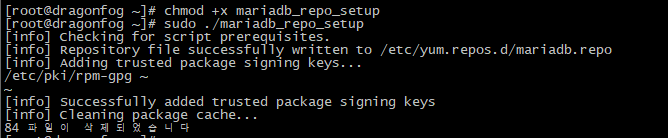
Repository 등록이 완료되었으면 아래 명령어를 실행하여 mariadb를 설치 한다.
$ sudo yum install MariaDB-server

MariaDB 설치 후 DB 기동 및 접속
# systemctl start mariadb.service
# mysql -u root -p
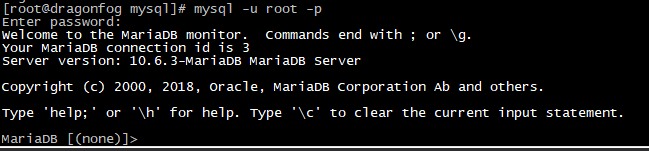
여기 까지 문제 없이 진행되었다면 DB 설치가 정상적으로 완료된것입니다.
추가로 아래 명령어를 통하여 간단한 보안 설정을 진행 할수 있습니다.
# mysql_secure_installatio
[dragonfog@dragonfog ~]# mysql_secure_installation
NOTE: RUNNING ALL PARTS OF THIS SCRIPT IS RECOMMENDED FOR ALL MariaDB
SERVERS IN PRODUCTION USE! PLEASE READ EACH STEP CAREFULLY!
In order to log into MariaDB to secure it, we'll need the current
password for the root user. If you've just installed MariaDB, and
haven't set the root password yet, you should just press enter here.
Enter current password for root (enter for none):
OK, successfully used password, moving on...
Setting the root password or using the unix_socket ensures that nobody
can log into the MariaDB root user without the proper authorisation.
You already have your root account protected, so you can safely answer 'n'.
Switch to unix_socket authentication [Y/n] y
Enabled successfully!
Reloading privilege tables..
... Success!
You already have your root account protected, so you can safely answer 'n'.
Change the root password? [Y/n] y
New password:
Re-enter new password:
Password updated successfully!
Reloading privilege tables..
... Success!
By default, a MariaDB installation has an anonymous user, allowing anyone
to log into MariaDB without having to have a user account created for
them. This is intended only for testing, and to make the installation
go a bit smoother. You should remove them before moving into a
production environment.
Remove anonymous users? [Y/n] y
... Success!
Normally, root should only be allowed to connect from 'localhost'. This
ensures that someone cannot guess at the root password from the network.
Disallow root login remotely? [Y/n] n
... skipping.
By default, MariaDB comes with a database named 'test' that anyone can
access. This is also intended only for testing, and should be removed
before moving into a production environment.
Remove test database and access to it? [Y/n] y
- Dropping test database...
... Success!
- Removing privileges on test database...
... Success!
Reloading the privilege tables will ensure that all changes made so far
will take effect immediately.
Reload privilege tables now? [Y/n] y
... Success!
Cleaning up...
All done! If you've completed all of the above steps, your MariaDB
installation should now be secure.
Thanks for using MariaDB!
'DB > RDBMS' 카테고리의 다른 글
| Mariadb slow query log 설정 (0) | 2022.04.06 |
|---|